Replace a shipped sound
Replace audio that Phoenix Point already plays. ContentTool bakes your file into a bank in your mod; the player needs no DLL.
The quick way: the bench
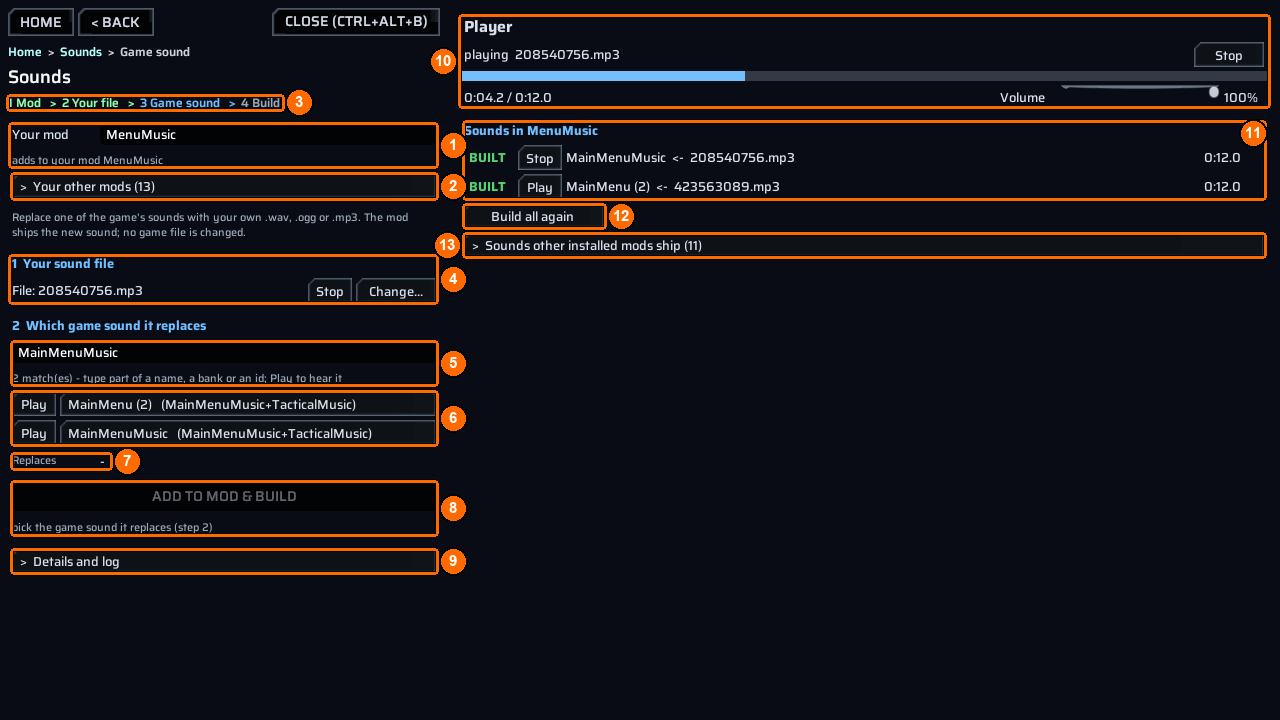
- Open the bench and choose
Sounds. Type your mod’s name inYour mod(1). - Under
1 Your sound file(4), pick your.wav,.oggor.mp3. PressPlay(4) to hear it. - Search for the game sound (5). Press
Playbeside a match (6) to hear it, then click its name to pick it.Replaces(7) confirms your pick. - Press
Add to mod & build(8). The bench copies your file toContent\Audio\Replace\<mediaId>.<ext>, runsct_sound bake, and loads the bank. Check the mark underSounds in <mod>(11):LIVEmeans you can hear it now; otherwise restart the game.
Sounds explains the screen in full. The steps below are the console and manual way to make the same replacement.
You need
- An installed, enabled ContentTool and a WAV, OGG or MP3 file with mono or stereo audio.
- The shipped media ID you want to replace. An event ID is a different number.
Folder layout
MySoundMod\
  meta.json
  ppcontent.json
  Content\
    Audio\
      Replace\
        sting_confirm.mp3      <- source file
  Dist\
    Sounds\
      633458426.bnk           <- written by ct_sound bake
      sources.ledger          <- source fingerprints; ships with the banks
Steps
- Find the media ID in the game console:
Look for a matching name and read the number in its first column. loose media can also be extracted; in-bank media can be listed but cannot be extracted.
- To hear a loose original, extract its media ID:
Look under <persistentDataPath>\ContentTool\Extracted\audio for its numeric .wem and decoded .wav. To search many sounds, run ct_extract audio --all or ct_extract audio --all <filter>. The bulk decode starts in the background, permits one run at a time, and writes index.csv. Its progress and final report appear in the log.
To identify what a game action posts, start ct_voices watch, perform that action, and read the resulting event-to-media report. Use the media number for replacement.
- Put
sting_confirm.mp3directly inContent\Audio\Replace. Createmeta.json:
{
  "ID": "example.mysoundmod",
  "AssemblyName": "",
  "Version": "1.0.0",
  "Name": [{ "Key": "English", "Value": "My sound mod" }],
  "Dependencies": ["com.morgott.ContentTool"]
}
- Create
ppcontent.jsonwith the media ID and exact source filename:
{
  "id": "example.mysoundmod",
  "bundle": "MySoundMod.bundle",
  "sounds": [
    { "media": 633458426, "file": "sting_confirm.mp3" }
  ]
}
A source named <mediaId>.wav, <mediaId>.ogg or <mediaId>.mp3 needs no sounds row: its numeric stem supplies the ID.
- Bake, then package from the game console:
The bake writes one bank per accepted replacement into Dist\Sounds. It preserves the target loop region only when the shipped target is a loose .wem; an in-bank target gets no loop region.
Check it worked
Look for these bake lines, then enable the packaged mod and trigger the original game sound:
declared 1 replacement(s) in <project>\Content\Audio\Replace
baked <project>\Dist\Sounds\633458426.bnk: <bytes> B, bankId=<id>, media 633458426 = <ms>ms <ch>ch <rate>Hz, <loop report> from sting_confirm.mp3
ct_sound bake: 1/1 bank(s) in <project>\Dist\Sounds, 0 refused - NO game file was opened for writing. ContentTool loads these at init.
A successful package reports PACKAGED <n> file(s), <bytes> B into <persistentDataPath>\ContentTool\Packaged\MySoundMod. It also reports LEFT BEHIND <n> source file(s) for baked replacement sources. Those files remain in your author project; the release ships the banks and sources.ledger.
Common errors
| What you see | Why | Fix |
|---|---|---|
ct_sound bake REFUSED: "sounds" names 'sting_confirm.mp3' for media 633458426, and there is no such file in <dir> - nothing was baked |
The row names a missing file. | Put that file in Content\Audio\Replace or correct file. |
bake REFUSED 633458426 is not one of the <count> media IDs Phoenix Point owns - nothing would ever play it |
The number is not a shipped media ID. | Find the media ID with ct_list audio or ct_voices watch. |
REFUSED: Content\Audio\Replace\<file> (media <id>) - a sound replacement that was NEVER BAKED. |
The release has a declared source but no bank. | Run ct_sound bake MySoundMod, then package again. |
REFUSED: Content\Audio\Replace\<file> (media <id>) - CHANGED SINCE IT WAS BAKED. |
Its bytes differ from the sources.ledger fingerprint. |
Bake again, then package again. |
WARN: Content\Audio\Replace\<file> (media <id>) is newer than its bank in Dist\Sounds and no sources.ledger entry says which bytes that bank holds. |
Only file dates are available; the package is not refused on that evidence alone. | If you edited the source after baking, bake again. |
See messages for more refusals.
Example
ReplaceUiSounds maps filenames to shipped media IDs. MenuMusic uses numeric filenames.