Fit a weapon
Use Fit a weapon to adjust how a weapon your mod already adds sits in a soldier’s hand. The weapon must be loaded in this game session, which means its mod was enabled when the game started. To make a new weapon first, follow Add a weapon; its step 3 has the same fit controls with sliders.
The step bar reads Soldier, Weapon, Adjust, Save.
Example: adjust your mod weapon in a soldier’s hand
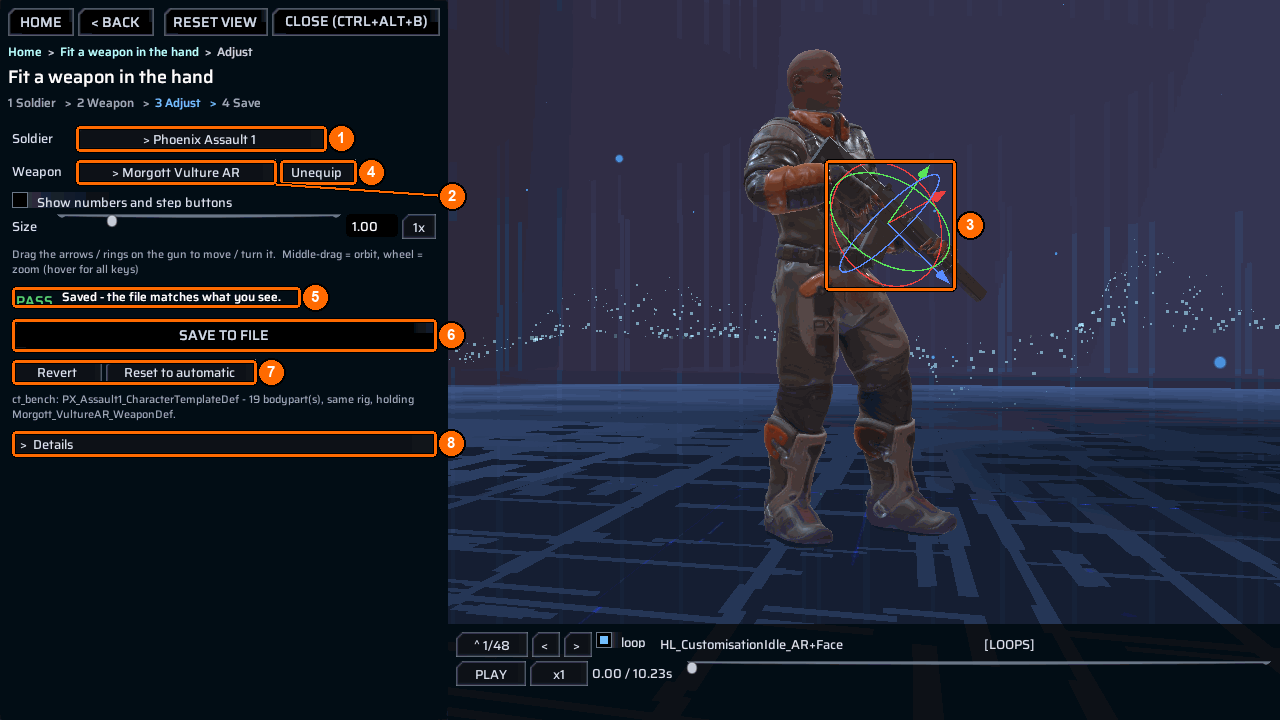
- Open the bench and choose
Fit a weapon. - Click the button beside
Soldier(1) to open the soldier list with its find box. Pick the soldier who will hold the weapon. A*marks a unit built by a content mod. Pressrescanif you enabled a mod while the bench was open. - Click the button beside
Weapon(2) to open the weapon list. Type part of your weapon’s name. The hint reads<n> of <m> weapons fit this soldier * = made by your mod (<k>). A*marks a weapon your mod made;* livemeans its fit is loaded this session, so it can be adjusted. Tickallto also list weapons this soldier cannot equip. - Look at the weapon in the hand. Drag the arrows on the weapon (3) to move it and the rings to turn it about that axis. A dimmed handle is edge-on to the camera; turn the camera to use it.
Esccancels a drag. The camera controls work as on every 3D screen. Unequip(4) takes the weapon out of the hand andRe-equipputs it back, so you can compare.- When the badge (5) says
Changed - not saved yet., pressSave to file *(6). It writes the fit into your mod’sppcontent.json; the path is inDetails(8). The badge then saysSaved - the file matches what you see.
Undo
Revert(7) goes back to what the file says. It does not touch the disk.Reset to automaticgoes back to the measured fit and drops every override. It does not touch the disk either; pressSave to fileto keep it.
When Save is grey
The line under Save to file says what is missing:
| Line | What to do |
|---|---|
pick a weapon first |
Pick a weapon in step 3. |
this is a game weapon - it is in the hand for comparison only; only weapons your mod builds have a file to save into |
Shipped weapons can stand beside yours for comparison, but have no file to save. Pick your weapon. |
wait - the weapon has not loaded in the hand yet (re-pick it if this stays) |
Wait a moment, or pick the weapon again. |
Console alternative
Give a soldier the weapon in game, then run:
The first command reports the current fit; save writes it to the mod’s ppcontent.json.