Build & share
Use Build & share to turn a mod folder into an installed, tested mod and a package to share. It runs the same stages as the console commands, under plain names, and shows each result and the full log. See the lifecycle for what each stage means.
Keep this screen open while a run is working: Build, Install and Verify install need it on screen.
Pick a mod and build it
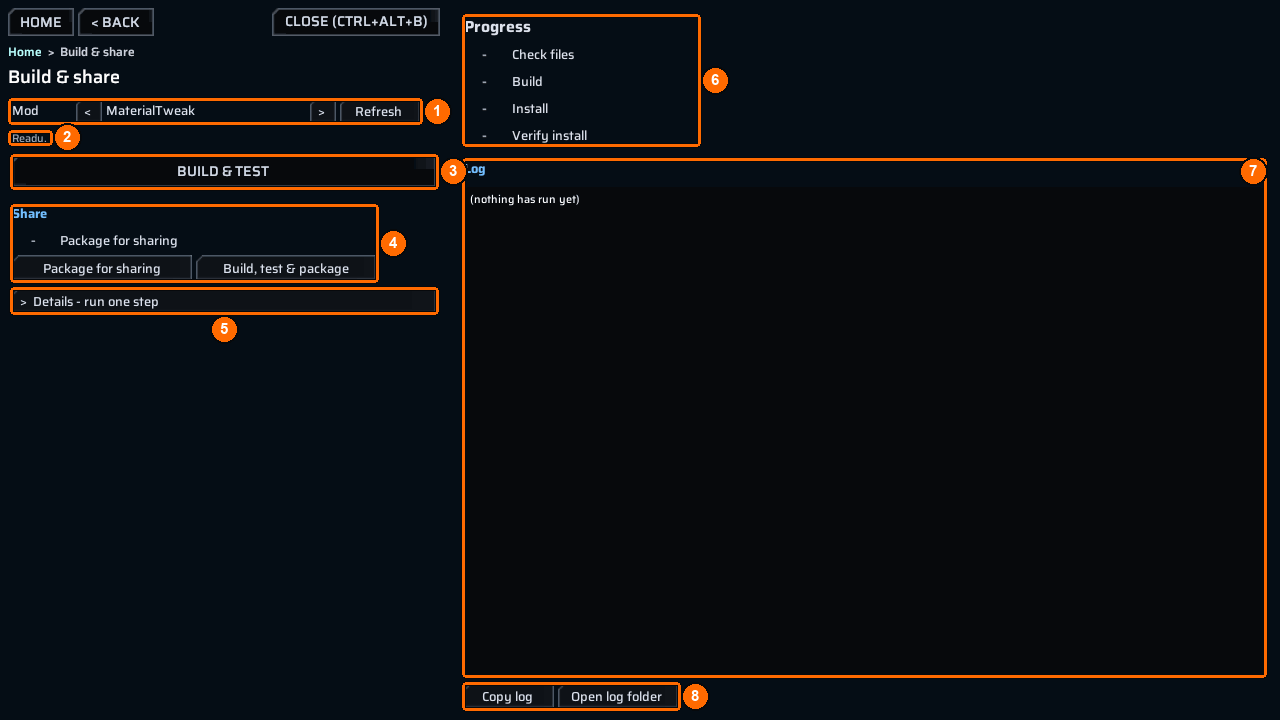
- Open the bench and choose
Build & share.Replace a modelandAdd a weaponbring you here with their mod already selected. - Use
<and>besideMod(1) to select your mod. PressRefresh(1) if you added a mod folder or changed the folders. - Read the status line (2).
Ready.means you can start. - Press
Build & test(3). It runs the four steps below in order and stops at the first one that fails or is refused. If it is grey, the line under it says why, for examplepick a mod above first. - Watch
Progress(6): each step gets its mark and the first line of its result. TheLog(7) fills with the full output; it reads(nothing has run yet)before the first run.Copy logandOpen log folder(8) work as on every screen.
| Step | What it does | Console equivalent |
|---|---|---|
Check files |
Checks ppcontent.json and the source files it names. Writes nothing. |
— |
Build |
Bakes the project. | ct_project <mod> |
Install |
Applies the patched copies. | ct_route7 apply <mod> |
Verify install |
Checks that the game loads the installed copies and serves the declared targets from them. | ct_route7 verify <mod> |
| Mark | Meaning |
|---|---|
PASS |
The step succeeded. |
FAIL |
The step failed; read its line and the log. |
VOID |
The step did not establish a result; its line says why. |
- |
Not run yet. |
* after a mark |
The mod’s project key changed since that step ran, so the result may be out of date. Run it again. |
While a run is going, Cancel asks it to stop. Steps already finished keep their results; later steps are skipped.
Fix a failed build
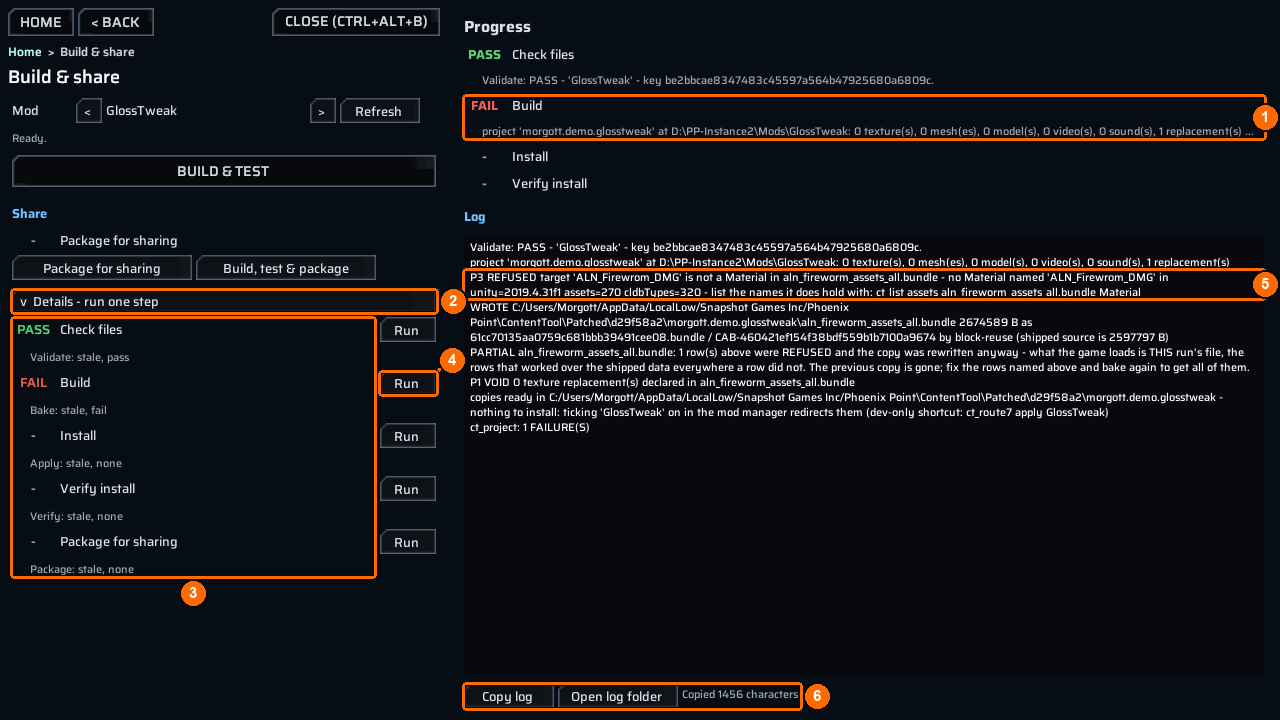
In this example the GlossTweak mod names a material with a typo.
ProgressshowsFAILatBuild(1);InstallandVerify installnever ran.- Open
Details - run one step(2). Every stage has a row (3) with its state, such asBake: stale, fail, and its ownRunbutton (4) that runs only that step. - Find the refusal in the log (5):
P3 REFUSED target 'ALN_Firewrom_DMG' is not a Material in aln_fireworm_assets_all.bundle. The line also names the command that lists the real names:ct_list assets aln_fireworm_assets_all.bundle Material. - Correct the name in
ppcontent.json(ALN_Fireworm_DMG), then pressRunbesideBuild(4), orBuild & testto run everything again. - If you need help, press
Copy log(6); the bench confirmsCopied 1456 characters. Paste it into your message.
Restart cases
- The status says
restart required: the game had already loaded the shipped bundle before the redirect. Restart the game with the mod enabled, then runVerify install. - A copy the game is already serving cannot be rebuilt while it is loaded. Restart with the mod disabled, build, then enable it and restart again.
Package for sharing
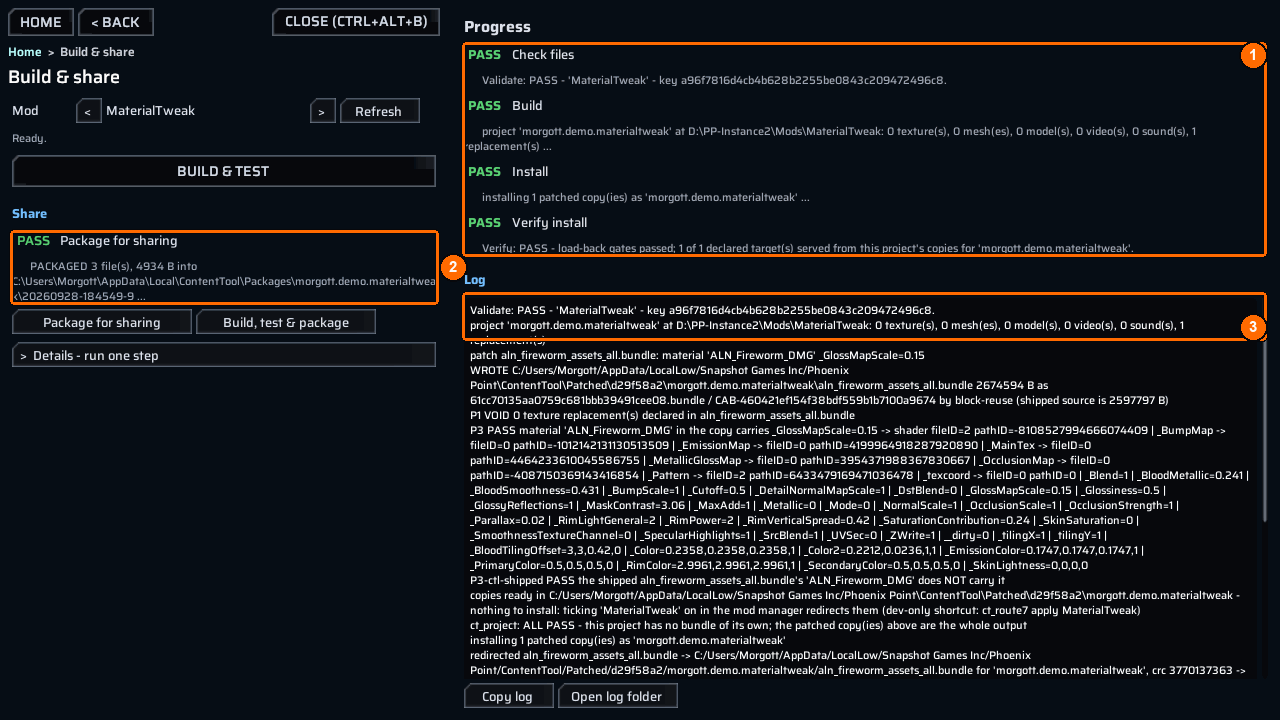
- Check that all four steps show
PASS(1). - Under
Share(2), pressPackage for sharing.Build, test & packageruns all five steps in one go instead. - The
Package for sharingrow turnsPASSand shows where the package went (2), for examplePACKAGED 3 file(s), 4934 B into ...\ContentTool\Packages\morgott.demo.materialtweak\20260928-164013-7. - Read the end of the log (3): zip the folder itself, so the archive holds
20260928-164013-7\meta.json, and upload it. A player unzips it intoMods\or subscribes on the Workshop; the mod manager enables ContentTool for them becausemeta.jsondeclares it.
Every bench package gets its own new folder:
The console packager, ct_package <mod>, writes under <persistentDataPath>\ContentTool\Packaged\<mod> instead. Whichever you use, install and test the exact package you intend to share. Check files and packaging do not need this screen on view; the other steps do.