Videos
Use Videos to replace one of the game’s cutscenes with your own clip, or to add a new one. The clip is served from your mod’s folder; no game file is changed. You can watch both clips in the bench first.
The step bar reads 1 Mod > 2 Your clip > 3 Game video > 4 Apply.
Example: replace the Phoenix Project intro
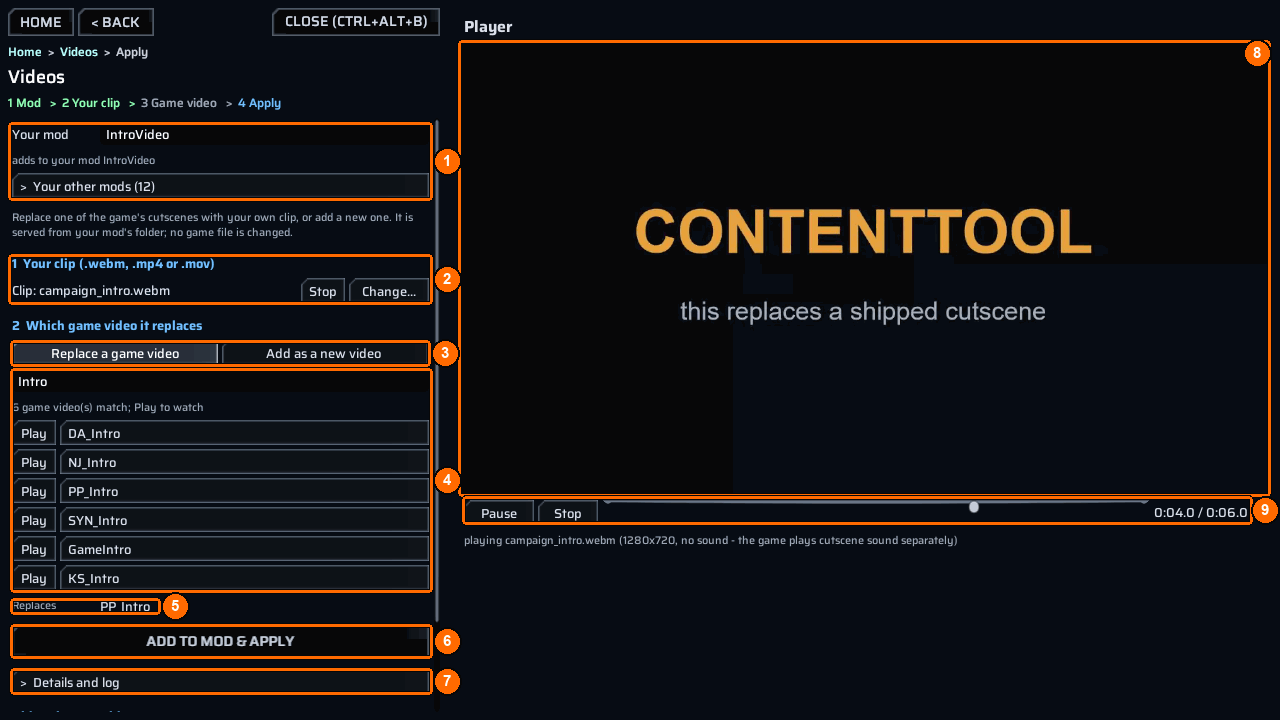
- Open the bench and choose
Videos. - Type
IntroVideoinYour mod, or pick it underYour other mods(1). - Under
1 Your clip (.webm, .mp4 or .mov)(2), pressPick...and choosecampaign_intro.webm. PressPlay(2) to watch it; it becomesStopwhile it plays. - Under
2 Which game video it replaces, keepReplace a game videoselected (3). - Type
Introin the search box (4). The hint says how many game videos match. PressPlaybeside one to watch it. ClickPP_Introto pick it; the picked one gets a>in front. - Check that
ReplacessaysPP_Intro(5). - Press
Add to mod & apply(6). It copies your clip into the mod’sContent\Videosfolder, writes its row inppcontent.json, then serves it withct_video live. - Read the result line. Open
Details and log(7) for each clip’s state.
The next time the game plays that video, it plays your clip.
If Add to mod & apply is grey, the line under it says what is missing: pick your clip first (step 1) or pick the game video it replaces, or 'Add as a new video' (step 2).
The player
The Player (8) shows the picture as large as the pane allows. Under it (9) are Pause (then Resume), Stop, a seek bar, and the time. The line under the transport says what is playing, for example playing campaign_intro.webm (1280x720, no sound - the game plays cutscene sound separately). Leaving the screen stops playback.
Check or apply again
Scroll the panel down to Videos in IntroVideo. It lists every video row of the mod as <your clip> -> <game video> (or new video):
| Mark | Meaning |
|---|---|
OK |
The clip is in Content\Videos. |
MISSING |
No clip of that name is in Content\Videos. |
Play watches your clip. Apply again runs ct_video live <mod> for every row, for example after you replaced a clip file. Videos other installed mods ship (<n>) lists clips from your other installed mods.
The result line says applied - each clip's state is in Details; a served clip plays the next time that video starts, or applied with problems - see Details.
Rules the screen enforces
- One clip name, one file: a clip with the same name and a different extension is refused, so rename your file.
- A clip you replace with different bytes keeps the old file beside it as
.bak. - One game video per clip: a clip name or game video that the mod already uses for another row is refused.
Add a new video
Select Add as a new video (3) instead of picking a game video. Replaces becomes Adds a new video (your mod's code plays it). The game never plays a new video by itself: your mod’s code must start it with its RuntimeKey, which Details and log prints. Follow Add or replace a video for that part.